If you’ve been waiting to see whether the latest Biggest Sims 4 Changes July 2026 update is worth your attention, the answer is yes. The June 30 patch introduced one of the most meaningful collections of bug fixes and gameplay improvements in recent months. While it doesn’t add a new Expansion Pack, it significantly improves everyday gameplay, Build Mode, careers, Gallery performance, and several long-standing issues reported by the community.
Want more Sims 4 secrets?
Weekly House Packs
Hidden Features Guides
VIP Challenges
For players who enjoy building, storytelling, legacy gameplay, or creating custom content, these changes make The Sims 4 feel smoother and more reliable. Many of the fixes target problems that players had been reporting for months, making this update especially valuable for long-term saves.
In this guide, we’ll explore the 20 biggest Sims 4 changes you need to know in July 2026, explain why each one matters, and discuss how these improvements affect builders, storytellers, and everyday players.
Why This Update Matters
Unlike content updates that mainly introduce new furniture or Create-a-Sim items, this patch focuses on stability and quality of life.
The update addresses several community-voted issues, including:
- Gallery loading problems
- Career progression bugs
- Notification spam
- Royalty & Legacy gameplay issues
- Pet interactions
- Relationship inconsistencies
- Performance improvements
These fixes are particularly important because they improve the core gameplay experience rather than adding temporary features.
1. Phone Calls Finally Feel Less Annoying
One of the most requested improvements has finally arrived.
For years, Sims constantly received random phone calls asking strange questions:
- “Should I date this Sim?”
- “Should I change careers?”
- “Should I have another baby?”
While funny at first, these calls quickly became repetitive.
The July 2026 update dramatically reduces unnecessary calls. Sims now receive fewer interruptions during gameplay, making storytelling feel much more natural.
For players who enjoy immersion, this small change makes a surprisingly large difference.
2. Silent Mode Actually Works
Previously, enabling Silent Mode didn’t completely stop notifications.
Many players noticed that even with the phone muted, calls still appeared.
This has finally been corrected.
Now, enabling Silent Mode genuinely minimizes interruptions, allowing players to focus on building, decorating, or playing through long Legacy challenges without constant distractions.
Builders who spend hours in Build Mode will especially appreciate this improvement.
3. Neighborhood Stories Behave More Naturally
Neighborhood Stories continues to evolve.
Before this update, Sims often contacted players with decisions that felt completely random.
Now, conversations are more believable.
Close friends and family members are much more likely to call than complete strangers.
This creates a more immersive world where relationships actually matter.
For Legacy saves spanning multiple generations, this makes storytelling much more realistic.
Want more Sims 4 secrets?
Weekly House Packs
Hidden Features Guides
VIP Challenges
4. Duplicate Notifications Have Been Fixed
Another frustrating issue involved receiving the same notification repeatedly.
Examples included:
- Friendship updates
- Relationship changes
- Career notifications
- Family announcements
Many players reported receiving identical messages multiple times during a single session.
The patch removes most of these duplicates, making the notification system cleaner and easier to follow.
5. Gallery Loading Is More Reliable
The Gallery remains one of The Sims 4’s most important features.
Millions of players download:
- Houses
- Rooms
- Sims
- Community Lots
- Custom tattoos
Unfortunately, some Gallery pages could become stuck on an infinite loading screen.
This update significantly improves Gallery stability.
Players should experience:
- Faster searches
- Fewer loading errors
- More reliable downloads
- Better browsing performance
For creators who regularly upload builds, this is one of the most valuable fixes in the patch.
Why Builders Benefit the Most
The recent improvements particularly help players who spend most of their time creating content.
Builders now experience:
- Fewer Gallery issues
- Less interruption from phone calls
- Better notification management
- More stable long-term save files
Combined, these changes make large building projects much more enjoyable.
What This Means for Mods
Although many popular mods required updates immediately after the June 30 patch, most major creators have already released compatible versions.
If your game behaves strangely after updating, remember to:
- Remove outdated mods.
- Clear the localthumbcache package.
- Download the latest versions from the original creators.
- Test your game without mods before reporting bugs.
Keeping your mods updated remains the best way to avoid conflicts after every major Sims 4 patch.
6. Custom Tattoos Now Download Correctly from the Gallery
The Gallery has become one of the most important parts of The Sims 4 community. Players don’t just share houses and Sims anymore—they also upload custom tattoos, styled rooms, and unique character designs.
Before the latest update, downloading Sims with custom tattoos could cause missing designs, loading errors, or incomplete transfers. Some creations simply didn’t appear as intended after being placed in the game.
The June 30 patch fixes many of these problems. Custom tattoos now transfer much more reliably through the Gallery, making it easier to share original characters without losing important details.
This is especially good news for creators who design realistic Sims or publish makeover collections.
7. Infinite Gallery Loading Screens Have Been Reduced
One of the most frustrating bugs affected builders who spent hours browsing community creations.
Sometimes the Gallery would continue loading forever, forcing players to restart the game. This interrupted building sessions and occasionally caused players to lose unsaved progress.
The latest update improves communication between the Gallery and EA’s online services, making searches and downloads much more reliable.
Although occasional server issues may still occur, infinite loading screens should now be far less common.
If you regularly download houses, community lots, or family saves, you’ll notice this improvement immediately.
8. Doctor Career Is Fully Playable Again
The Doctor career is one of the most popular active careers because players control their Sims throughout the workday.
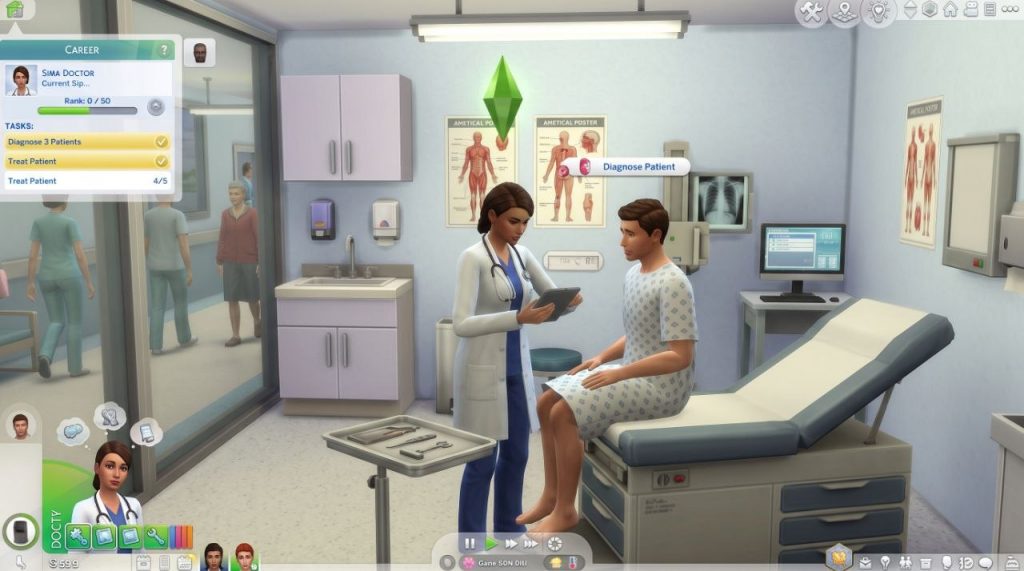
However, recent patches introduced several frustrating bugs:
Common issues included:
- Medical interactions failing to appear.
- Patients refusing treatment.
- Career tasks not completing correctly.
- Promotion progress becoming stuck.
- Examinations resetting unexpectedly.
The latest update restores proper functionality to many of these interactions.
Doctors can once again diagnose patients, complete work objectives, earn promotions, and finish shifts without constant interruptions.
Players who enjoy realistic gameplay or rotational saves will appreciate having this career back in working order.
9. Pets Behave Much Better
Cats and Dogs received several important bug fixes.
Many players experienced strange behaviors such as:
- Small dogs refusing baths.
- Adoption interactions failing.
- “Feel the Love” not completing.
- Pets becoming temporarily unresponsive.
These issues have now been addressed.
Daily life with pets feels much smoother, allowing family gameplay to continue without awkward interruptions.
For Legacy households where pets remain part of multiple generations, these improvements make everyday gameplay far more enjoyable.
10. Royalty & Legacy Gameplay Is More Stable
One of the newest gameplay systems introduced exciting ways to create royal families and long-running dynasties.
However, players quickly discovered several problems affecting succession and family management.
Among the biggest issues were:
- Incorrect family notifications.
- Children appearing in unexpected succession lists.
- Repeating alerts.
- Dynasty progression behaving inconsistently.
The latest patch fixes many of these problems.
Royal households now behave much more predictably, allowing players to focus on storytelling instead of troubleshooting game mechanics.
For anyone creating medieval kingdoms, noble families, or historical saves, this update is especially valuable.
How These Changes Improve Daily Gameplay
Individually, these fixes may seem relatively small.
Together, however, they remove dozens of tiny frustrations that interrupted normal gameplay.
Players now spend less time dealing with:
- Broken interactions.
- Endless loading screens.
- Notification spam.
- Career bugs.
- Pet glitches.
Instead, gameplay flows much more naturally.
This is exactly the type of update long-time Sims players usually appreciate the most—one that makes every gaming session smoother without changing the game’s core mechanics.
Why This Matters for Builders and Content Creators
For players who publish houses on the Gallery or create Sims-related content, stability is essential.
These fixes reduce the chances of:
- Failed uploads.
- Missing custom content.
- Broken Gallery downloads.
- Interrupted building sessions.
Whether you’re creating luxury mansions, cozy cottages, or entire save files, the improved reliability makes sharing creations much easier.
11. Relationship Bugs After Create-a-Sim Have Been Fixed
One of the more confusing issues introduced in previous updates involved relationships changing unexpectedly after editing Sims in Create-a-Sim (CAS).
Players reported problems such as:
- Family members suddenly losing relationship progress.
- Friends becoming strangers.
- Romantic relationships resetting.
- Household dynamics changing without explanation.
These bugs were especially frustrating for Legacy players who had invested dozens of hours into carefully developed family stories.
The latest patch resolves many of these inconsistencies, helping preserve relationship data when returning from CAS.
This makes editing outfits, hairstyles, or accessories much safer for long-term saves.
12. Romantic Interactions Are More Reliable
Romance is one of the core gameplay systems in The Sims 4, but recent updates caused several awkward interaction failures.
Some players experienced:
- Romantic socials canceling automatically.
- Sims refusing to flirt despite positive relationships.
- Conversation queues resetting unexpectedly.
- Wedding-related interactions failing to complete.
The July 2026 update improves interaction reliability across many romance-related actions.
While occasional routing issues can still occur in crowded lots, romantic gameplay now feels much smoother overall.
This is excellent news for players focused on weddings, storytelling, or relationship-based challenges.
13. Inventory Objects No Longer Become Stuck
Builders and collectors encountered another frustrating issue involving inventory management.
Items such as:
- Paintings
- Photographs
- Collectibles
- Decorations
could occasionally become attached to the mouse cursor or refuse to move into inventory slots.
Sometimes players had to restart the game just to recover normal controls.
The latest patch fixes many of these inventory problems, making object management far more reliable.
Players who enjoy photography, collecting, or decorating family homes will notice the difference immediately.
14. Duplicate Sims Are Much Less Common
A strange bug caused certain Sims to appear more than once in neighborhoods.
Examples included:
- Duplicate townies.
- Multiple versions of the same NPC.
- Repeated service Sims.
- Confusing household lists.
Although not every duplication issue has been eliminated, the latest update significantly reduces the likelihood of duplicate Sims appearing during normal gameplay.
This creates a cleaner, more believable world—especially in long-running saves.
15. Event Invitations Now Feel More Meaningful
Festival invitations, Stay Overs, neighborhood events, and social gatherings have all received improvements.
Previously, Sims often received invitations that felt random or repetitive.
For example:
- Multiple invitations on the same day.
- Invitations from complete strangers.
- Events that conflicted with careers or school.
The updated system now considers relationships and timing more carefully.
As a result, invitations feel less intrusive and much more natural within ongoing stories.
Why These Small Fixes Matter
Many players focus only on Expansion Packs when evaluating updates.
However, quality-of-life improvements often have a greater long-term impact.
Small annoyances repeated hundreds of times eventually become major frustrations.
Reducing those interruptions allows players to spend more time:
- Building dream homes.
- Managing families.
- Completing challenges.
- Creating stories.
- Exploring new gameplay.
The game simply feels smoother.
Better Stability for Long-Term Saves
Players with Legacy saves lasting dozens of generations benefit the most from this patch.
Long saves tend to expose hidden bugs over time, including:
- Broken relationships.
- Duplicate Sims.
- Notification loops.
- Inventory glitches.
By fixing many of these systems, EA has improved the stability of saves that players have been developing for months—or even years.
For storytellers, this is one of the most valuable improvements in the entire update.
16. Stay Over Invitations Work More Consistently
Stay Over visits have become a favorite feature for family-oriented players, but previous updates introduced several annoying issues.
Some Sims stopped receiving invitations entirely, while others received repeated requests from the same households. In some cases, invited Sims never arrived or left immediately after checking in.
The latest patch improves the reliability of Stay Over events. Invitations now occur more naturally, guests behave more predictably, and overnight visits are less likely to break ongoing gameplay.
For players who enjoy family storytelling or generational saves, this makes social gameplay much more enjoyable.
17. Better Performance on Large Save Files
As save files grow over multiple generations, performance often begins to decline.
Players with Legacy challenges or rotational gameplay reported:
- Longer loading screens.
- Slower Build Mode performance.
- Delayed interactions.
- Minor stuttering while switching households.
While this update isn’t a complete performance overhaul, it includes several behind-the-scenes optimizations that improve stability in larger saves.
If you’ve been playing the same world for months, you should notice smoother gameplay overall.
18. Build & Buy Mode Feels More Stable
Builders spend countless hours in Build Mode, so even small improvements make a big difference.
This patch resolves several issues related to placing objects, adjusting walls, and moving decorations. Certain windows, doors, and decorative items now behave more consistently after editing rooms or changing wall heights.
Combined with Gallery improvements, creating and sharing houses is now a much smoother experience.
Whether you’re building modern villas, medieval castles, cozy cottages, or luxury mansions, Build Mode feels more reliable than before.
19. Improved Overall Game Stability
Many of the changes included in this update aren’t immediately visible.
Instead, EA focused on improving systems running in the background.
These technical fixes reduce:
- Unexpected interaction failures.
- User interface glitches.
- Soft-lock situations.
- Random gameplay interruptions.
- Minor save inconsistencies.
Although players may not notice these improvements individually, together they create a far more polished experience.
20. More Community-Requested Bugs Have Finally Been Fixed
Perhaps the biggest success of this update is that many fixes came directly from community feedback.
Over the past several months, thousands of players reported bugs through the official EA forums. The June 30 patch addresses many of the highest-voted issues, showing that player feedback continues to influence future updates.
This is encouraging for the Sims community because it demonstrates that long-standing problems are still being reviewed and resolved.
Final Thoughts
The Biggest Sims 4 Changes July 2026 update may not introduce a brand-new Expansion Pack, but it significantly improves the overall quality of the game.
Instead of adding more content while leaving existing issues unresolved, EA focused on making everyday gameplay smoother, more stable, and more enjoyable.
From Gallery improvements and career fixes to better relationship handling, fewer annoying notifications, and stronger long-term save stability, nearly every type of player benefits from this patch.
Builders can create with fewer interruptions.
Storytellers enjoy more reliable relationships.
Legacy players experience better save stability.
Family players benefit from improved pet behavior and social interactions.
Although mods may still require updates after major patches, the base game is currently in one of its most stable states of 2026.
If you’ve taken a break from The Sims 4, July is an excellent time to jump back in and experience these improvements for yourself.
Frequently Asked Questions (FAQ)
What is the biggest Sims 4 update in July 2026?
The biggest gameplay improvements come from the June 30 patch, which carries into July 2026. It focuses on bug fixes, Gallery stability, career improvements, relationship fixes, and overall game performance.
Were any new gameplay features added?
No major gameplay systems were introduced. Instead, the update concentrates on fixing long-standing bugs and improving quality of life.
Are mods compatible with the July 2026 update?
Many popular mods required updates after the June 30 patch. Always download the latest versions from their creators before loading your save.
Is the Gallery working better now?
Yes. The update significantly improves Gallery reliability by reducing infinite loading screens and improving the handling of shared creations, including custom tattoos.
Should I update my game immediately?
Yes. If your essential mods have already been updated, installing the latest patch is recommended because it fixes many of the most commonly reported issues.