Moving your Sim into Foxbury Institute or the University of Britechester is an exciting milestone, but default university housing leaves a lot to be desired. The pre-built dormitories are often sprawling, strangely proportioned, or filled with unused empty space that makes student life feel sterile. Crafting thoughtful small dorm room layout ideas Sims 4 players can rely on transforms these oversized boxes into cozy, functional living quarters. Compact layouts not only look significantly better, but they also cut down on Sim travel time, keeping your student focused on term papers, exams, and making it to class on time.
Make a Small Dorm Room Feel Bigger
Small dorm rooms can still feel comfortable and stylish when every piece of furniture has a purpose. The key is to use vertical space, keep the floor as open as possible, and choose compact organizers that help reduce clutter.
A few smart additions can make a small room feel much more functional without making it look crowded.
SHOP SMALL DORM ROOM ESSENTIALS
Why Choose Small Dorm Room Layouts in The Sims 4?
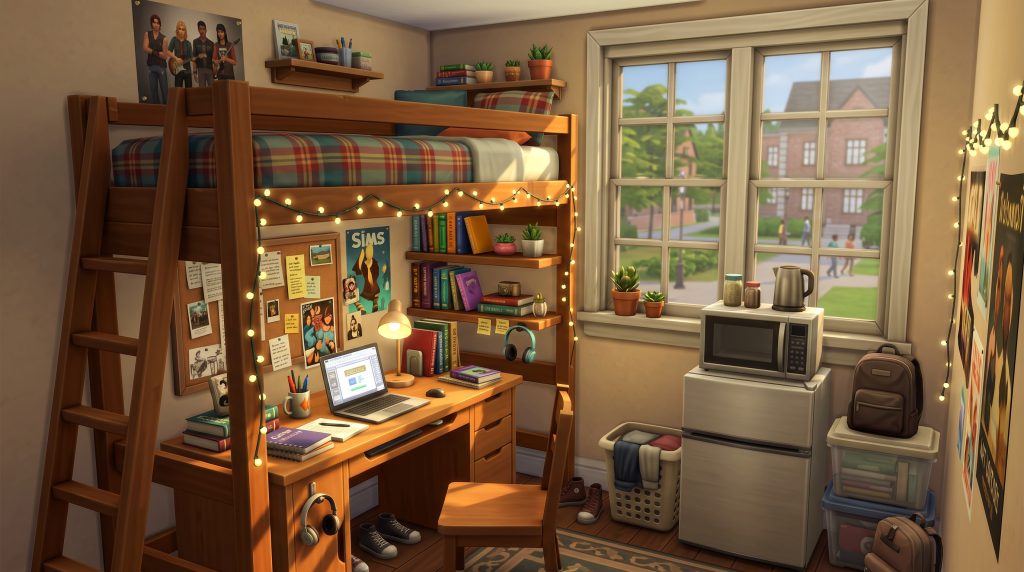
Designing tiny rooms inside university housing might seem counterintuitive when you have large floor plans available, but downsizing offers massive advantages in gameplay functionality and visual appeal.
Improved Sim Routing and Efficiency
Large, spread-out dorm rooms force your Sims to walk long distances just to grab a quick snack from the mini-fridge or sit down to work on a homework assignment. In a tight university schedule where every minute counts before class starts, long routing animations can mean the difference between getting an A or failing a term. A compact floor plan keeps every essential item within a few grid tiles, making morning routines smooth and fast.
Cozy Realism and Immersive Storytelling
Real-life college dormitories are notoriously tight on space. When you build massive, empty rooms, your dorms lose that authentic university atmosphere. Shrinking the room footprint allows you to build dense, highly detailed spaces packed with personality. Using clever tiny dorm room floor plans Sims 4 techniques makes dorms feel lived-in, featuring stacked textbooks, personal clutter, hanging posters, and functional multi-use furniture zones.
Essential Build Mode Tips for Tiny University Housing
Before jumping into specific floor plans, you need to understand how Build Mode mechanics operate within university dorms. Mastering grid management and height features ensures your small layouts stay playable without causing routing errors.
Understanding Grid Space and Tile Efficiency
In The Sims 4, every object occupies a specific tile footprint, but Sims also require extra tile space for interaction routing. A standard bed requires a 1×2 tile space, but it also needs at least one open tile beside or at the foot of the bed for your Sim to enter it. When planning compact rooms, always test your routing paths to ensure Sims do not wave their arms in frustration because a chair or desk accessory blocks their path.
Using Platforms and Room Elevation
Platforms introduced in modern game updates are ideal for defining sub-zones in micro-dorms without building obstructive interior walls. Elevating a study nook or sleeping section by one or two platform steps visually isolates the zone while preserving open sightlines across the tiny layout. You can even tuck decorative items or small rugs along platform edges to give the room added texture.
Use Every Inch of Your Dorm Room
When space is limited, storage doesn’t have to take up valuable floor space. Hanging organizers, under-bed containers, and compact shelving can help keep everyday items organized while leaving more room for the things that matter.
Think vertically whenever possible and keep frequently used items within easy reach.
Optimizing Wall Heights and Vertical Space
When floor space is severely limited, vertical space becomes your greatest asset. Setting your walls to Medium or Tall gives you ample room to stack wall shelves, display posters, place tall bookcases, and hang overhead lights. These Sims 4 university housing build tips help keep essential floor surfaces open for your Sims to move around easily.
15 Functional Small Dorm Room Layout Ideas
Here are fifteen complete layout concepts designed specifically for compact dorm living, ranging from micro-single rooms to shared double setups.
1. The Loft Bed Study Studio
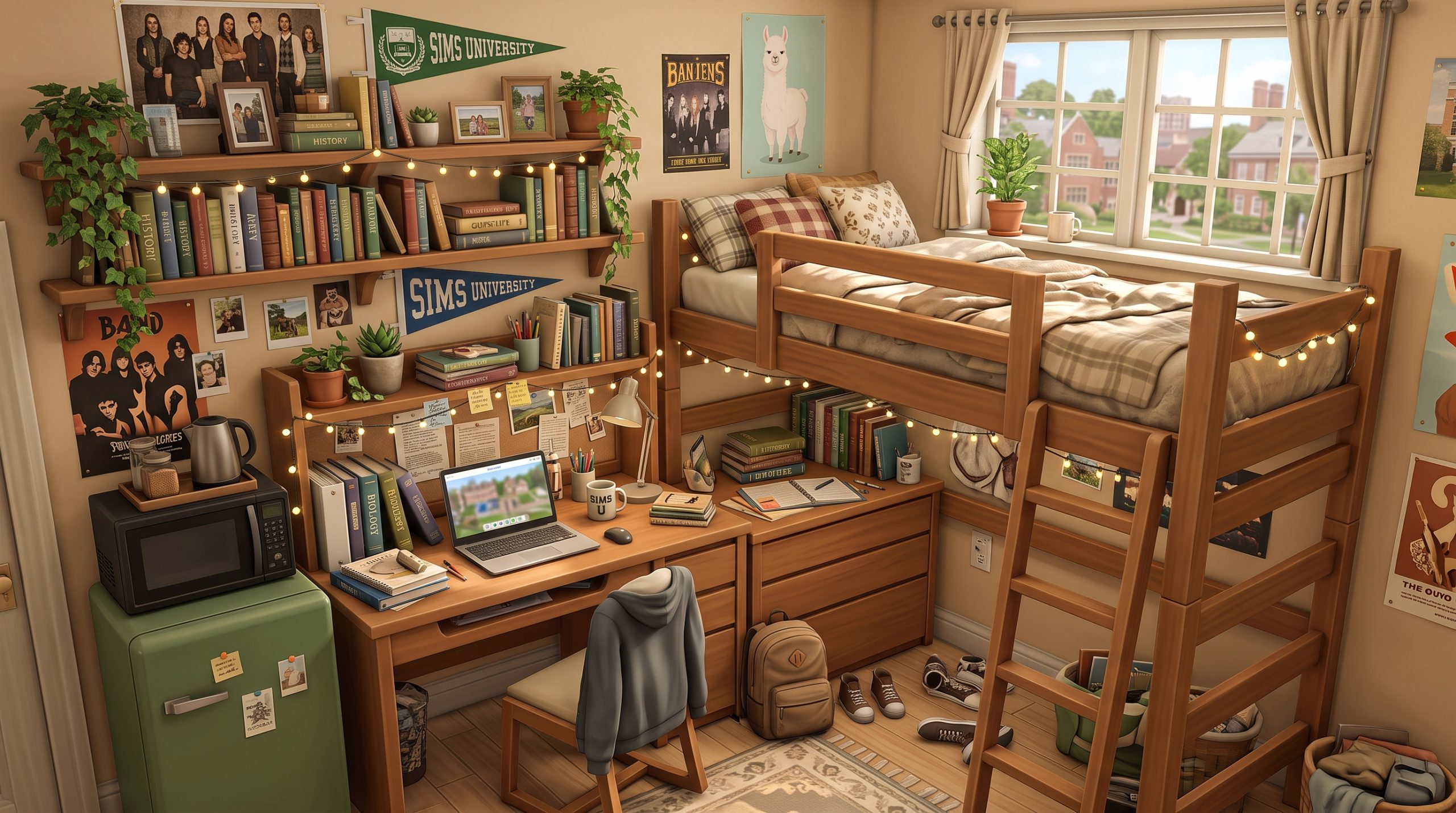
This classic 3×3 layout uses a single loft bed raised above a full-sized study desk and laptop computer. By stacking the sleeping and studying spaces vertically, you free up six full floor tiles for a micro-dresser, a trash room, and an entry rug.
2. The Micro Single Sanctuary
Designed on a minimal 2×3 grid, this layout places a single bed flush against the back wall with a wall-mounted TV overhead. A narrow single-tile desk sits beside the bed, serving as both a nightstand and a study surface.
3. The Parallel Dual Student Zone
For shared rooms, place two single beds running parallel along opposite walls. Install a long, continuous build-mode counter spanning the back wall between them to serve as a shared study desk with built-in mini-fridges underneath.
4. The L-Shaped Corner Suite
Place a single bed tucked along one corner wall and fit an L-shaped desk arrangement along the adjacent corner. This keeps the center of the room completely clear, offering perfect routing flow from the entryway door.
5. The Raised Platform Bed Nook
Build a 2×2 platform raised two steps high in the back corner of the room. Position the bed directly on top of the platform, using wall lamps for illumination. The area below the platform step holds a desk and small dresser.
6. The Back-to-Back Shared Layout
Place two single beds headboard-to-headboard down the middle of a 4×3 room. Place low-profile bookcases between the headboards to act as a physical divider, giving both roommates privacy and individual study desk areas along their respective outer walls.
7. The Murphy Bed Multi-Purpose Room
By using the folding Murphy Bed from The Sims 4 Tiny Living Stuff Pack, your Sim can fold away their bed during the daytime, turning their 3×3 dorm into an open living room or group study hub with folding chairs and a coffee table.
8. The Bookcase-Partitioned Split Room
Divide an oblong 5×2 room in half using open-backed shelving units instead of full solid walls. One side serves as a quiet sleeping chamber with a single bed and wardrobe, while the other side functions as a mini study lounge.
9. The Window Bench Workstation
Position your Sim’s desk directly in front of a wide university window to maximize natural light. Surround the desk with wall-mounted shelves and place a small single bed perpendicular along the neighboring wall.
10. The Walk-Through Corridor Layout
Ideal for narrow 2×4 floor plans, this setup keeps all main furniture—a narrow bed, mini fridge, and thin desk—aligned along one continuous wall, keeping a straight, unhindered pathway along the opposite wall for smooth walking routing.
11. The Cozy Gamer Den Layout
Place a loft bed over a comfortable lounge arm-chair and game console setup, placing the study desk along the opposite wall. This gives your college Sim a dedicated area to unwind after long study sessions without sacrificing square footage.
12. The Diagonal Space Maximizer
Placing furniture at a 45-degree angle in corner spaces can soften sharp room angles. Angle the bed into a far corner and place triangular corner shelves above it to utilize awkward corner geometry efficiently.
13. The Half-Wall Privacy Enclosure
Use short half-walls to enclose a single bed, creating a built-in daybed aesthetic. This physically hides the bed from the room’s main entrance area while preserving light flow across the ceiling.
14. The Stacked Wardrobe Loft
Utilize a loft bed that includes built-in lower wardrobe closets. Combine this piece with a slim laptop desk positioned at the foot of the bed to condense all living, storage, and study functions into a compact 2×3 grid footprint.
15. The Creative Arts Micro Studio
Swap out standard study desks for a combination of a single loft bed, a portable floor easel beneath it, and wall-mounted digital sketchpads, leaving space for an acoustic guitar or violin in the corner.
How to Fit Multi-Functional Furniture in a Small Sims 4 Dorm
When experimenting with small dorm room layout ideas Sims 4 players quickly realize that selecting the right items in Build Mode matters just as much as grid placement. Multi-functional furniture pieces are essential for squeezing maximum utility out of small spaces.
Loft Beds and Integrated Desks
Loft beds from the base game updates and various expansion packs are single-handedly the best functional items for tiny dorms. They allow you to place study desks, mini-fridges, armchairs, or dressers directly underneath the top bunk. This effectively doubles your usable floor area per tile.
Counter-Top Mini Fridges and Microwaves
University dorms do not allow full-sized stoves or kitchen counters by default, but your Sims still need access to quick meals. Place a compact mini-fridge inside your room and place a microwave directly on top of it. This creates a fully functional single-tile quick-meal prep station.
Here is a quick overview of key space-saving furniture options and their grid footprints:
| Furniture Item | Grid Size | Primary Function | Best Placement Tip |
|---|---|---|---|
| Loft Bed | 1×2 Tiles | Sleeping + Open Lower Space | Place desk or armchair directly beneath it |
| Mini-Fridge | 1×1 Tile | Food Storage | Stack a microwave directly on top |
| Wall Mounted TV | 1×1 Tile (Wall) | Entertainment | Hang high on wall over desks or beds |
| Single Column Bookcase | 1×1 Tile | Skill Building / Storage | Position in corner gaps or alongside doorframes |
Decorating Small Dorms Without Overcrowding Floor Space
Once you set down the primary furniture items, decorating your room brings character and warmth. However, dropping clutter everywhere can quickly block routing paths if you are not cautious.
Relying on Wall Decor and Tapestries
Wall space is completely free of routing collision hitboxes. You can cover walls with college flags, string lights, photo collages, and corkboards without taking up a single millimeter of floor space. Check out Sims 4 Discover University dorm ideas for inspirational visual themes like bohemian, retro gamer, or minimalist academic styles.
Smart Clutter Placement using Wall Shelves
Instead of placing textbook stacks, pencil holders, and coffee mugs directly on desks or the floor, install floating wall shelves directly above study desks. You can stack clutter items onto these shelves to give your dorm room a charmingly detailed, messy student aesthetic while keeping desk surfaces completely clear for actual homework interactions.
Using Mirrors and Rugs for Visual Depth
Full-length wall mirrors placed near entrance doors or beside wardrobes reflect light and give the illusion of a much larger room. Similarly, small accent rugs placed under desks or bed bases unify distinct floor zones without obstructing Sim movement.
Best Sims 4 Cheats for Building Compact University Dorms
Vanilla build constraints can make tight builds frustrating. Utilizing essential Build Mode cheats gives you precise control over object placement, enabling creative micro-layouts that would otherwise be impossible.
How to Edit Dorm Lots
By default, university housing lots in The Sims 4 Discover University are locked, preventing you from altering structural walls or buying standard objects while live mode is running. To unlock total creative freedom, follow these steps:
- Open the command console by pressing
Ctrl + Shift + C(or all four shoulder buttons on consoles). - Type
testingcheats trueand press Enter. - Type
bb.enablefreebuildand press Enter.
This command unlocks full build mode editing rights on restricted university lots, allowing you to tear down walls, reconfigure floor layouts, and replace default items instantly.
Unlocking Object Overlapping and Elevation
To place detailed space saving dorm decor Sims 4 items right where you want them, activate the object placement cheat by typing bb.moveobjects on into your cheat console. With this cheat active, you can build with precise control using these shortcut keys:
- Press
[or]: Shrinks or enlarges selected objects, letting you reduce large plants or clutter items to fit tiny shelves. - Press
9and0: Raises or lowers objects vertically along the wall axis, perfect for placing floating clutter without snapping to default desk slots. - Hold
Altwhile moving an object: Disables default grid snapping, allowing smooth, organic placement anywhere in the room.
Frequently Asked Questions
How do you edit dorm rooms in The Sims 4 Discover University?
To edit dorm rooms while playing, open the cheat console using Ctrl + Shift + C, enable testing cheats with testingcheats true, and enter the cheat code bb.enablefreebuild. This unlocks standard Build/Buy mode on locked university housing lots, letting you edit walls, floors, and interior furnishings freely.
How do I fit two Sims into a small dorm room in The Sims 4?
To fit two Sims into a tight space, use vertical stacking strategies. Place two single loft beds with study desks or dressers positioned directly underneath them, or place two single beds headboard-to-headboard down the middle of the room. Using wall-mounted lights and thin single-tile desks keeps floor routing open for both roommates.
What are the best space-saving items for Sims 4 dorms?
The single best space-saving items are loft beds, single-tile mini-fridges topped with microwaves, wall-mounted televisions, single-column shelving units, and modular floating wall shelves. Multi-functional pieces like Murphy beds and loft beds with integrated lower desks offer maximum functionality while taking up minimal floor space.
Can you build custom dorms from scratch in The Sims 4?
Yes, you can build custom dorms from scratch, but you must do so from the Manage Worlds map view or by activating the bb.enablefreebuild cheat on an existing lot. Ensure your lot type is set to “University Housing” and satisfy all required lot requirements listed in the lot panel, such as minimum bed counts, study desks, and mini-fridge stations.
Conclusion
Transforming bland university housing into personalized academic retreats makes attending college in The Sims 4 far more rewarding and enjoyable. By mastering grid efficiency, raising furniture verticality, and employing build cheats, you can build gorgeous spaces that enhance gameplay performance and visual appeal. Try applying these practical small dorm room layout ideas Sims 4 builders rely on during your next university term to give your student Sims the perfect balance of cozy style and functional efficiency.