Moving your Sim into a university residence hall in Britechester or Foxbury Institute is a milestone moment, but the default accommodations leave a lot to be desired. Between the drab wallpaper, plain furniture, and murky shadows, standard student housing can feel uninspiring. If you are tired of staring at dreary brick walls while your Sim grinds out their term papers, exploring creative Sims 4 dorm room lighting ideas is the absolute best way to transform a cramped, clinical space into a warm, modern sanctuary. Proper illumination does far more than help you see your Sim—it sets the tone for their college career, highlights your interior design choices, and gives small student quarters a realistic, cozy feel.
In this guide, we will break down everything you need to know to master dorm room illumination. We will look at space-saving wall fixtures, functional desk lighting, atmospheric ceiling arrangements, and essential build mode tricks to bypass strict university lot restrictions. Whether you are aiming for a trendy boho aesthetic or a crisp modern vibe, these practical styling strategies will completely revitalize your student living spaces.
Bring Your Sims 4 Dorm Lighting Ideas Into Real Life
Lighting is one of the easiest ways to completely change the atmosphere of a small dorm room. You don’t need a full makeover — a few carefully placed lights can make your space feel cozy, colorful, modern, or completely gaming-inspired.
From RGB LED strips to soft bedside lamps and decorative wall lights, the right lighting can turn a basic student room into a space that feels uniquely yours.
Why Lighting Matters in Sims 4 University Dorms
Lighting is often an overlooked element in interior design, yet it dictates how every other object in a room visually interacts with the camera. In The Sims 4 Discover University, default dorm rooms are notoriously dim. The combination of high wall settings, small windows, and sparse overhead fixtures leaves large patches of shadow across the floor tiles, making even beautifully decorated rooms look muddy and unappealing.
Upgrading your light sources fundamentally changes the ambiance of the space. When you take control of room illumination, you can alter the perceived size of a tiny student bedroom, draw attention to cute clutter items, and create distinct functional zones within a single compact layout.
Overcoming Default Dorm Gloom
When your Sim moves into a pre-built lot like Drake Hall or Tidal Tower, the initial build layout prioritizes utility over visual warmth. The game often uses basic utility overhead fixtures that emit harsh, cold light over limited radiuses. This leaves corners dark and gives skin tones a pale, flat appearance.
By swapping out these basic fixtures or supplementing them with warmer, layered alternatives, you break up those flat shadows. Replacing standard cool-white illumination with soft golden tones immediately brings warmth to wooden desks, fabric rugs, and custom bed bedding.
Impact on Sim Mood and Environment Buffs
Beyond aesthetic value, lighting directly interacts with your gameplay experience through environment ratings and player clarity. While lights themselves rarely carry dedicated environment points unless specified in build mode, bright and carefully placed objects boost the visual clarity of high-environment items in the room.
When your Sim sits down for a late-night study grind, having a dedicated lamp on their desk or an ambient light source overhead helps frame the activity. It also makes zooming in for screenshots or story recording significantly clearer and more vibrant.
Defining Zones in Shared Living Spaces
Dorm rooms are multi-functional spaces where Sims sleep, study, eat, and socialize within a tight footprint. Lighting plays a massive role in visually segmenting these areas without building intrusive privacy walls.
- Study Zones: Require direct, focused desk lamps to simulate productive task lighting.
- Sleeping Areas: Benefit from low-intensity sconces or string lights that evoke relaxation.
- Social Corners: Work best with warm floor lamps or accent lighting near mini-fridges and armchairs.
Using different light types across these zones creates depth, making a simple 5×5 bedroom feel like a thoughtful, fully realized apartment.
Cozy String Lights and Wall Sconces for Small Spaces
When tile real estate is at a premium, keeping floor and desk surfaces clear is vital for pathfinding and aesthetics. Wall-mounted fixtures are the unsung heroes of small bedroom builds because they provide personality and illumination without occupying valuable floor grids.
Incorporating wall fixtures is a core strategy for achieving cozy Sims 4 dorm decor. They draw the eye upward, filling empty vertical space on plain dorm walls while casting soft downlight over furniture.
Fairy Lights and Wall Garland Combinations
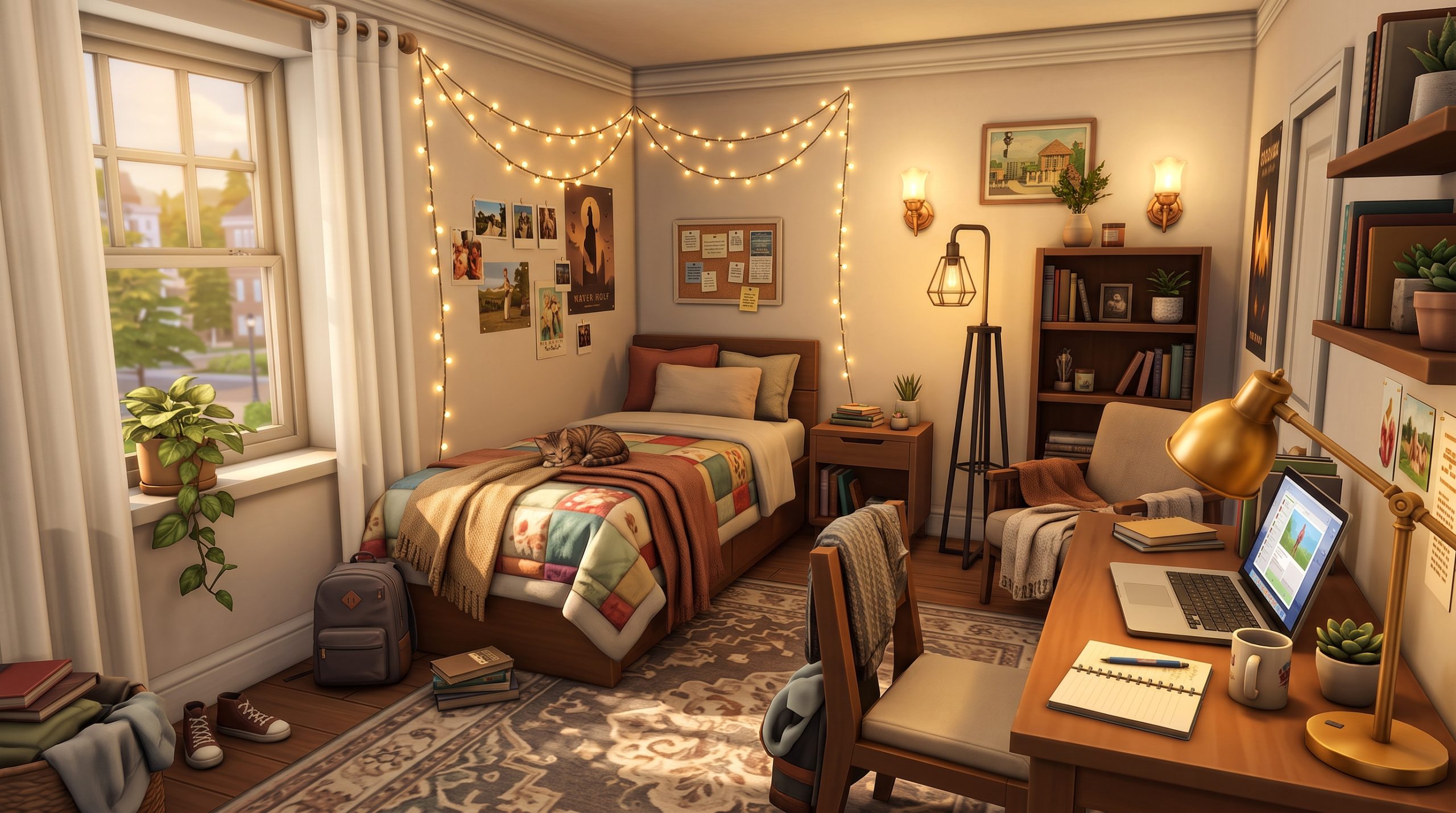
String lights are a staple of real-life college dorm decor, and The Sims 4 offers several fantastic options across various packs. Fixtures like the draped wall lights from Parenthood, High School Years, or Discover University add instant charm above a Sim’s headboard or study desk.
To maximize their visual impact, pair string lights with Polaroid photos, hanging postcards, or hanging wall tapestries. Placing a string light directly above a pinboard creates a lived-in look that mirrors authentic student living. These fixtures emit a soft, wide-spread glow that softens sharp room edges.
Space-Saving Wall Sconces
If string lights are too playful for your Sim’s personality, modern wall sconces offer a sleek, sophisticated alternative. Sconces project light both upward and downward, creating dynamic visual patterns along painted or brick walls.
Positioning matching sconces on either side of a bed frame frames the sleeping area beautifully. Alternatively, placing a minimal sconce directly above a floating wall shelf adds architectural interest to plain drywall without taking up desk space.
Creating Warmth with Low-Lumen Fixtures
The secret to cozy lighting lies in warmth rather than raw brightness. Many smaller wall lights emit a gentle glow that doesn’t wash out nearby furniture. When building a relaxed atmosphere, look for sconces crafted from natural materials like wood, matte black iron, or frosted glass.
By keeping the brightness modest on wall fixtures, you create intimate pockets of light that contrast pleasantly with the rest of the room. This technique makes evening hours in the game look exceptionally inviting.
Modern Floor and Desk Lamps for Student Rooms
Table lamps and standing fixtures bridges the gap between pure utility and personal style. Because student desks and corners are focal points in any university room build, selecting the right standing fixtures can dramatically raise the room’s interior design standard.
When selecting portable fixtures, you need to consider both aesthetic style and practical foot traffic. A misplaced floor lamp can trigger frustrating pathfinding blocks for your Sim, so smart positioning is crucial.
Functional Desk Lighting for Late-Night Studying
A student desk feels incomplete without a dedicated task lamp. Selecting sleek, adjustable metal lamps or small ceramic table lights gives the workstation a grounded, purposeful feel. Placing a lamp on the corner of the desk leaves room for laptops, textbooks, and coffee mugs while providing focused illumination.
If you prefer a minimalist look, consider small accent lamps that double as decor pieces, such as small salt lamps, modern glowing globes, or retro geometric fixtures. These options offer subtle ambient light that keeps the desk looking organized and clean.
Corner Floor Lamps that Don’t Block Foot Traffic
Unused room corners are prime locations for standing floor lamps. An arching floor lamp tucked behind a cozy armchair or placed alongside a bookshelf instantly upgrades an awkward empty corner into an inviting reading nook.
To ensure floor lamps do not interfere with your Sim’s routing, pay attention to object footprints in Build Mode:
- Place floor lamps on single-tile corners away from doorway swing paths.
- Avoid placing thick-based lamps directly adjacent to the head of a bed where Sims need to step.
- Use slim, single-pole floor lamps when working with ultra-narrow walkways.
Blending Industrial and Boho Styles
Mixing items from different packs is a great way to avoid a generic, pre-furnished appearance. Pairing modern industrial floor lamps from Discover University with colorful boho-style desk lamps from Cottage Living or Eco Lifestyle gives the bedroom an authentic, curated feel.
Don’t be afraid to experiment with contrast. A metallic tripod floor lamp juxtaposed against soft pastel bedding and wooden shelving creates an eclectic, lived-in aesthetic that feels custom-built.
Ambient Ceiling Lighting Ideas for Compact Sims Bedrooms
While accent lamps and wall sconces provide mood and atmosphere, ambient ceiling fixtures are essential for establishing the baseline brightness of a room. Without an effective overhead light source, room corners will remain dim regardless of how many small lamps you place.
However, selecting overhead fixtures for small dorms requires extra care. Hanging chandeliers or long pendant lights can block camera angles during gameplay and look visually intrusive in low-ceiling rooms.
Flush-Mount Ceiling Fixtures vs. Hanging Pendants
For low or medium wall heights typical of standard dorm buildings, flush-mount or semi-flush-mount ceiling lights are usually the best choice. These flat, recessed, or close-to-ceiling fixtures spread light broadly across the floor plan without hanging down into your gameplay camera view.
Pendant lights, on the other hand, should be reserved for specific low-traffic spots, such as directly above a dining nook, a corner desk, or a central coffee table. Placing a sleek pendant directly above a study desk provides a deliberate, architectural drop light that visually highlights the workspace.
Hidden Overhead Lighting Tricks
One of the best techniques used by veteran builders to maintain smooth lighting without cluttering ceilings is using “invisible” overhead sources. By using small, subtle recessed spotlights or sizing down simple ceiling discs, you can fill dark room patches without altering the room’s design.
If you want to explore more structural concepts for student housing, checking out Sims 4 small space lighting tips can give you additional inspiration for optimizing tight room layouts efficiently.
Customizing Light Color and Intensity
Default lights in The Sims 4 are automatically set to a neutral white color at 100% intensity. This default setting often causes stark glare on white furniture and creates unrealistic contrast in smaller spaces. Customizing these settings in Live Mode is the single most effective way to improve room ambiance.
By switching light colors to warm golden, peach, or soft white tones and reducing overall intensity to between 50% and 70%, you instantly soften the entire environment. Implementing tailored color palettes across all fixtures is a cornerstone of professional Sims 4 Discover University lighting setups.
How to Use Sims 4 Lighting Cheats for Custom Placement
Building in official university housing comes with strict game rules. Under default settings, you cannot edit walls, remove existing fixtures, or enter Build Mode while live in a dorm room. Furthermore, grid snapping can restrict you from placing small lights exactly where you want them.
Fortunately, mastering a few key Sims 4 build buy lighting cheats unlocks total creative freedom, allowing you to bypass lot restrictions, place fixtures anywhere, and fine-tune object scale.
Essential Cheats: testingcheats and bb.moveobjects
Before you can customize light fixtures in university dorms, you need to open the cheat console and enable administrative controls. Press Ctrl + Shift + C (or all four shoulder buttons on console) to open the dialogue bar, then enter the following commands in order:
testingcheats true— Enables basic engine cheats.bb.enablefreebuild— Unlocks full Build/Buy Mode access on restricted university dorm lots.bb.moveobjects on— Disables grid restriction hitboxes, letting you place light fixtures anywhere.
With free build enabled, you can edit room layouts, replace dreary standard lamps, and overhaul the entire floor plan to suit your preferences.
Sizing Fixtures Down with Bracket Keys
Sometimes you find a light fixture with the perfect style or glow, but its physical object model is far too large for a small room. Using object scaling keys allows you to adjust fixture sizes precisely to fit your design layout.
With an object selected in Build Mode, press the [ (left square bracket) key to resize the light smaller, or the ] (right square bracket) key to make it larger. Sizing down large overhead lights or floor lamps lets you fit stylish fixtures into tight spaces while retaining their original illumination levels. Utilizing flexible Sims 4 dorm room lighting ideas like scaling down oversized light objects makes custom builds much easier to design.
Free Placement and Height Adjustment Controls
Grid snapping can prevent you from centering wall sconces above beds or mounting desk lamps precisely on non-standard surfaces. By holding down the Alt key while moving a light fixture in Build Mode, you can slide objects smoothly off the grid for pixel-perfect alignment.
Additionally, when an object is floating off-grid, you can adjust its height vertically along walls by tapping 9 to raise it up or 0 to lower it down. This control is perfect for stringing wall garlands at precise heights relative to nearby shelving or window frames.
Pro Tips for Layering Light Sources in Small Sims 4 Spaces
Relying on a single bright ceiling light creates flat, sterile spaces. Professional builders create stunning, realistic interiors by combining multiple light sources at varying heights—a concept known as light layering.
Layering creates contrast between highlighted areas and soft shadows, giving flat 3D models depth and texture. When applied to compact room layouts, light layering makes small rooms feel surprisingly expansive and atmospheric.
The Three-Tier Lighting Rule: Ambient, Task, and Accent
To execute effective light layering in your student housing, implement three distinct tiers of illumination throughout the room:
| Lighting Tier | Primary Purpose | Recommended Fixture Types |
|---|---|---|
| Ambient | Provides overall baseline room visibility without dark spots. | Flush-mount ceiling fixtures, subtle spotlight grids, hidden ceiling pucks. |
| Task | Illuminates specific functional work and living spaces. | Desk lamps, reading lights, under-cabinet lighting strips. |
| Accent | Draws focus to decor items and adds cozy visual character. | Fairy string lights, glowing clutter items, warm wall sconces. |
Combining these three tiers ensures that every square foot of your room has purposeful, balanced light coverage.
Matching Color Temperatures Across Fixtures
A common mistake in custom builds is mixing wildly different color temperatures in a single small space. Placing a cool blue LED desk lamp next to a warm orange wall sconce creates conflicting color casts that can look jarring.
Stick to a unified color temperature theme. Warm golden tones work best for cozy, rustic, or boho aesthetic builds. Neutral crisp whites are ideal for modern, industrial, or futuristic student rooms. If you choose to use colorful RGB accent lights (like neon sign art), pair them with neutral ambient lighting so the colors pop cleanly without tinting the entire room.
Integrating Light with Clutter and Shelving
You can make lights feel integrated into the environment by combining fixtures directly with shelf clutter, books, and plants. Using the free-placement cheat, tuck small accent lights onto open bookcases, wall racks, or window ledges.
Placing glowing decorative items—such as glowing jars, salt lamps, or mini terrariums—alongside potted plants and textbook stacks creates a warm, authentic student atmosphere. Choosing Sims 4 aesthetic dorm room lights that integrate smoothly into decorative clutter transforms standard rooms into tailored, personality-filled living spaces.
Frequently Asked Questions
How do you change lighting color and intensity in The Sims 4 dorms?
To change light color and intensity in a university dorm, have your Sim enter Live Mode on the lot. Click directly on any light fixture with your active Sim, select “Set Light,” and choose to alter either the individual light, the entire room, or all lights in the house. You can then pick from a color wheel palette and adjust the brightness slider percentage. If Build Mode is locked, use the cheat bb.enablefreebuild first.
What is the cheat to place lights anywhere in The Sims 4?
The cheat to place lights anywhere without grid placement restrictions is bb.moveobjects on. Open the command console using Ctrl + Shift + C, type this command, and press Enter. Once activated, you can move fixtures freely by holding down the Alt key while dragging objects into place.
Can you edit dorm room lighting without cheats in Discover University?
In Live Mode, you can change the light color and brightness intensity of existing lamps without using cheats simply by clicking on the light fixtures with your Sim. However, you cannot buy new lamps, delete existing default fixtures, or change physical placements in Build Mode without enabling the free build cheat bb.enablefreebuild.
How do you make a dark dorm room brighter in The Sims 4?
To brighten a dark dorm room quickly, enable free build mode and add discrete ceiling flush-mount fixtures or recessed lights across dark patches of the floor grid. Additionally, click on existing lights in Live Mode to set their intensity to 100% warm white, or replace dark wall coverings with brighter wall paints and reflect light using wall mirrors.
Conclusion
Transforming standard university housing into an inviting, stylish sanctuary is one of the most satisfying build projects in The Sims 4. By moving away from basic, single-source overhead lighting and embracing layered illumination, you can completely redefine how your student rooms look and feel during gameplay.
Whether you choose to drape fairy lights above headboards, install modern industrial floor lamps, or use cheat codes to build custom off-grid configurations, taking control of your space makes every study session and post-class hangout vastly more atmospheric. Experimenting with creative Sims 4 dorm room lighting ideas will not only eliminate dreary room shadows but also bring your Sim’s entire college experience to life.